
Ask questions, doubts, problems and we will help you..
Ask questions which are clear, concise and easy to understand.
Ask Question
CBSE, JEE, NEET, CUET
Question Bank, Mock Tests, Exam Papers
NCERT Solutions, Sample Papers, Notes, Videos
Posted by Shreya Pathak 5 years ago (9922027)
- 1 answers
Posted by Grick Sudrania 5 years ago (8659901)
- 2 answers
Vardhan Chauhan 4 years, 11 months ago (9714726)
Posted by Shreya Pathak 5 years ago (9922027)
- 0 answers
Posted by Muskan Garg 5 years ago (8724019)
- 2 answers
Gaurav Seth 5 years ago (2898529)
It is given that ,
p = 2 - a -------( 1 )
LHS = a³ + 6ap + p³ - 8
= a³ + 6a( 2 - a ) + ( 2-a )³ - 8 [ from(1)]
= a³ +12a-6a²+2³-3×2²a+3×2a²-a³-8
= a³ + 12a - 6a² + 8 - 12a + 6a²- a³ - 8
= 0
= RHS
Hence proved.
Posted by Goshwami Shrusti Shrusti 5 years ago (9451320)
- 1 answers
Posted by Bhuvan .V 8C2020 5 years ago (10225991)
- 4 answers
Himanshu Yadav 4 years, 11 months ago (10433085)
Jayanthasena E.L 4 years, 11 months ago (10066649)
Ishika Chaudhary 5 years ago (9203256)
Gaurav Seth 5 years ago (2898529)
. When a group of people or communities are excluded from the majority because of their language, customs, or religion, it is called Marginalisation
Marginalisation means the communities which are put at the margins of economic and cultural development. These communities are devoid of any changes or advancement which other people enjoy in modem times.

Posted by Kottavalasa Dhyanesh 5 years ago (10348315)
- 4 answers
Jitendra Tekam 4 years, 11 months ago (9845136)
Soumyashree Paital 5 years ago (9240553)
Lakshana S 5 years ago (10343717)
Posted by Aditi Rawat 5 years ago (8329614)
- 1 answers
Yogita Ingle 5 years ago (2577571)
(a) If MPS = 0.40, then
Multiplier (k) = 1/MPS = 1/ 0.40 = 2.5
(b) If MPC= MPS, then
2 MPS= 1
=> MPS =1/2 =0.5
Multiplier (k) = 1/MPS = 1/ 0.5 = 2
Posted by Ankan Mondal 5 years ago (10309936)
- 1 answers
Gaurav Seth 5 years ago (2898529)
The following are the factors for determining speed:
- Muscle composition: The muscles which consist of more percentage of fast twitch fibrescontract with morespeed and produce a greater speed. Different muscles of the body have different pwercentage of fast twitch fibres.
- Explosive strength: it depends on the shape, size and coordination of muscles. For very quick and explosive movement, explosive strength is required. The related proportion of fast twitch fibres and slow twitch fibres determines the maximum possible speed with which the muscle can contract.
- Flexibility: It also determines the speed. Good flexibility allows maximum range of movements and also enables complete utilization of explosive strength.
- Biochemical reserves and metabolic power: muscles requires more amount of energy and high rate of consumption for maximum speed performance. For this purpose the stores of ATP & CP in the muscles should be enough. If the store is less, the working process of the muscles slows down after short time.
Posted by Subash Gouda 5 years ago (10345459)
- 1 answers
Gaurav Seth 5 years ago (2898529)
In the given figure,
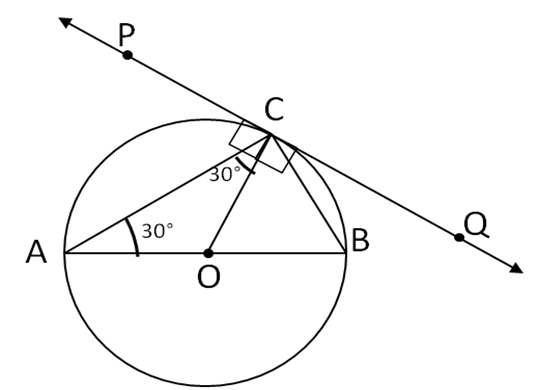
In Δ ACO,
OA=OC (Radii of the same circle)
Therefore,
ΔACO is an isosceles triangle.
∠CAB = 30° (Given)
∠CAO = ∠ACO = 30° (angles opposite to equal sides of an isosceles triangle are equal)
∠PCO = 90° …(radius is drawn at the point of
contact is perpendicular to the tangent)
Now ∠PCA = ∠PCO – ∠CAO
Therefore,
∠PCA = 90° – 30° = 60°
Posted by Nikhil Sidar 5 years ago (10348180)
- 1 answers
Gaurav Seth 5 years ago (2898529)
Suresh is having a garden near Delhi. In the garden, there are different types of trees and flower plants. One day due to heavy rain and storm one of the trees got broken as shown in the figure.The height of the unbroken part is 15 m and the broken part of the tree has fallen at 20 m away from the base of the tree.
Using the Pythagoras answer the following questions:
1) What is the length of the broken part?
A) 15 m
B) 20 m
C) 25 m
D) 30 m
2) What was the height of the full tree?
A) 40 m
B) 50 m
C) 35 m
D) 30 m
3) In the formed right-angle triangle what is the length of the hypotenuse?
A) 15 m
B) 20 m
C) 25 m
D) 30m
4) What is the area of the formed right angle triangle?
A) 100 m2
B) 200 m2
C) 60 m2
D) 150 m2
5 )What is the perimeter of the formed triangle?
A) 60 m
B) 50 m
C) 45 m
D) 100 m
Answer:
1)C
2)A
3)C
4)D
5)A
Posted by Aastha Bhurani 5 years ago (9786104)
- 1 answers
Yogita Ingle 5 years ago (2577571)
The non-farm activities of Palampur are:
Dairy farming:
People feed their buffaloes with various kinds of grass, jowar, bajra that grows during the rainy season.
The milk is sold in nearby villages.
Some people have set up collection centres and chilling centres from where milk is transported to far away towns and cities.
Small-scale manufacturing:
Manufacturing in Palampur involves very simple production methods and are done on a small scale.
They are carried out mostly at home.
This is mostly done with the help of family labour. Labour is rarely hired.
Shopkeeping:
Shopkeepers buy various goods from the wholesale market in the cities and sell them in the village.
Small general stores in the village sell a wide range of items like rice, wheat, sugar, oil, biscuits, soap, batteries, candles, toothpaste, pens, pencils, notebooks, and even some clothes.
Some families whose houses are closer to the bus stand have used a part of the space to open small shops. They sell eatables here.
Transport:
Rickshawallahs, tongawallahs, jeep, tractor, truck drivers and people driving the traditional bullock carts and bogeys are the people in transport services.
They carry people and goods from one place to another and in return get paid for it.
The number of people in transport services have risen over the last several years.
Self-employed:
Some people have opened coaching institutes for various kinds of arts like computer training centres or stitching classes, etc. to obtain profit from a non-farm activity and train more and more people for better opportunities in their lives.
Posted by B.Prajin B.Prajin 5 years ago (9573263)
- 2 answers
Yogita Ingle 5 years ago (2577571)
Saeeda’s mother had been suffering from fever, cough, body pain and joint pain etc. A number of physicians treated her. The quacks forbade her normal food. They also advised her to remain in the closed room. They asked her to avoid both sunshine and fresh air. Their advice did not help her. In fact she needed sunshine and fresh air for good health.
Then people suggested that she should consult a specialist. She was poor. However, she knew that life was more precious than money. So she consulted a specialist. She sold her ornaments also to meet the expenditure on medicines. The specialist examined her. He prescribed effective but costly medicines. He allowed her to eat anything of her taste. He laid most importance on fresh air and sunlight. He advised her to shift in a big room with doors and windows open. He asked her to sit in the sunlight from eight to nine daily.
Some people opposed the specialist’s advice. Saeeda’s mother did not listen to their proposals. She got her bed moved to a bigger room. She desired to sit in the sun on her cot for an hour daily.
Unluckily, it remained cloudy for a few days. She started lamenting and complaining to God.
Saeeda saw a spot of pale sunshine late in the afternoon. The people forbade Saceda’s mother to bask in the sun. They told her that it was too late and chilly. Saeeda requested the departing rays of the sun to come the next day with enough warmth and brightness. The rays gave her the desired promise because her ailing mother needed their help.
Next day the rays were keen to go to the earth early in the morning. After all they had given a word to Saeeda. But the sun said. “It’s our day off again. The road to earth is blocked by the clouds”. The ray who had given its word to Saceda said, “Sir, I can’t stay back …… I’ll pierce the clouds to reach Saeeda’s courtyard.”
The sunrays revolted against the sun to keep their honour. They focused their heat and the clouds scattered. The sunrays reached the earth a bit late. Saeeda’s mother basked in the sun and breathed in fresh air. Her pale face glowed. The doctor’s advice had a magical effect on her. She is fully recovered now.
Posted by Grick Sudrania 5 years ago (8659901)
- 2 answers
Vardhan Chauhan 4 years, 11 months ago (9714726)
Yogita Ingle 5 years ago (2577571)
Yes,
In Word, we can create a document by typing the text. The text we type is displayed on the screen. Press the SPACEBAR, to give space between words. For a new line or paragraph, press the ENTER Key.
Posted by Class 12 5 years ago (6013175)
- 1 answers
Gaurav Seth 5 years ago (2898529)
1. Summers are very hot in a desert
2. Mountains are very big.
3. Wild animals live in forest.
4. Sea water is very salty
5. River water is so cold.
1.गर्मी में रेगिस्तान में बहुत गर्म होता है
2. पहाड़ बहुत बड़े हैं।
3. जंगली जानवर जंगल में रहते हैं।
4. समुद्र का पानी बहुत नमकीन होता है
5. नदी का पानी इतना ठंडा होता है।
Posted by Lalithambika Lalithambika 5 years ago (9371135)
- 1 answers
Anay Tripathi 4 years, 11 months ago (8792849)
Posted by Lalithambika Lalithambika 5 years ago (9371135)
- 3 answers
Yogita Ingle 5 years ago (2577571)
A flowchart is a formalized graphic representation of a logic sequence, work or manufacturing process, organization chart, or similar formalized structure. The purpose of a flow chart is to provide people with a common language or reference point when dealing with a project or process.
Posted by Aman Ray 5 years ago (7235375)
- 2 answers
Gaurav Seth 5 years ago (2898529)
- यह जन भागीदारी को बढ़ावा देता है।
- यह छात्रों को आनंद, आनंद और मनोरंजन प्रदान करता है।
- यह एक सहपाठियों के बीच प्रतिभा को पहचानने में मदद करता है।
- यह ईमानदारी, अनुशासन, सहयोग और सहानुभूतिपूर्ण रवैये जैसे सामाजिक मूल्यों को विकसित करता है।
- It promotes mass participation.
- It provides fun, enjoyment and recreation to students.
- It helps to identify the talent among one’s classmates.
- It develops social values such as honesty, discipline, cooperation and sympathetic attitude.
- Variety of opportunities provide good leadership skills.
Posted by Badboy Gaming 5 years ago (10065798)
- 1 answers
Preeti Yadav 5 years ago (9895537)
Posted by Mukund Jha 5 years ago (9507731)
- 1 answers
Gaurav Seth 5 years ago (2898529)
बेल्जियम ने अपनी विविध जनसंख्या को एक ऐसी व्यवस्था के रूप में समायोजित किया जो विभिन्न समुदायों की आवश्यकताओं के अनुकूल थी। यह निम्नलिखित तरीकों से किया गया था:
- हालांकि डच देश में बहुमत में थे, केंद्र सरकार में फ्रेंच और डच बोलने वाली आबादी को समान प्रतिनिधित्व दिया गया था।
- बेल्जियम को एक संघीय राज्य के रूप में घोषित किया गया था, और इस प्रकार राज्य सरकारों को महत्वपूर्ण अधिकार दिए गए थे। राज्य सरकारों ने केंद्र सरकार के अधीनस्थ कार्य नहीं किया।
- राजधानी ब्रुसेल्स की एक अलग सरकार थी। हालाँकि, शहर में फ्रांसीसी बोलने वाली आबादी बहुमत में थी, लेकिन उन्होंने ब्रुसेल्स में समान प्रतिनिधित्व को स्वीकार किया। ऐसा इसलिए था क्योंकि डच भाषी लोगों ने बहुमत में होने के बावजूद केंद्र सरकार में समान प्रतिनिधित्व को स्वीकार किया था।
- सामुदायिक सरकार भी बेल्जियम में मौजूद थी जिसे प्रमुख भाषाई समूहों अर्थात् डच, फ्रेंच और जर्मन भाषी लोगों द्वारा चुना गया था। इस सरकार ने शैक्षिक, भाषा और शैक्षिक मुद्दों की देखभाल की
Posted by Badboy Gaming 5 years ago (10065798)
- 1 answers
Posted by Grick Sudrania 5 years ago (8659901)
- 1 answers
Yogita Ingle 5 years ago (2577571)
The Quick Access Toolbar is a customizable toolbar that contains a set of commands that are independent of the tab on the ribbon that is currently displayed. You can move the Quick Access Toolbar from one of the two possible locations, and you can add buttons that represent commands to the Quick Access Toolbar.
Posted by Shrey Jha 5 years ago (10324597)
- 1 answers
Gaurav Seth 5 years ago (2898529)
चंद्रगुप्त मौर्य मौर्य वंश के संस्थापक थे। उनके माता-पिता, उनके जन्म और बचपन के बारे में बहुत कम जानकारी है, झूठ का जन्म राजधानी पाटलिपुत्र में हुआ था। कौटिल्य, जिसे चाणक्य के रूप में बेहतर जाना जाता है, तक्षशिला के एक ब्राह्मण ने अनाथ को अपनी देखरेख में लिया, उन्हें सभी राजसी आवश्यकताओं में शिक्षित किया और उन्हें एक योग्य सेनापति और शासक बनने के लिए प्रशिक्षित किया। चंद्रगुप्त इस महान विचारक, राजनीतिज्ञ और राजनेता के प्रभाव में आने के लिए भाग्यशाली थे।
सैन्य उपलब्धियां:
1. पंजाब की विजय: चंद्रगुप्त ने चाणक्य के मार्गदर्शन में एक मजबूत सेना का निर्माण किया और पंजाब के क्षुद्र शासकों को पराजित किया और अपने क्षेत्रों का विनाश किया। फिर उन्होंने मगध के खिलाफ मार्च किया।
2. नंदा शासक का दोष: चंद्रगुप्त ने नंदों को हराने के लिए कई प्रयास किए। चाणक्य ने धनानंद को पद से हटाने की कसम खाई थी क्योंकि उन्होंने चाणक्य का अपमान किया था। अंत में धनानंद की हार हुई और मारे गए और चंद्रगुप्त मौर्य मगध के राजा बने और मौर्य वंश की स्थापना की।
धनानंद के दमनकारी शासन को उखाड़ फेंकने और समाप्त करने के बाद, चंद्रगुप्त ने अपनी शक्ति को मजबूत किया और देश को विदेशी कब्जे से मुक्त कर दिया। सिकंदर द्वारा सिंध और पंजाब प्रांतों में नियुक्त यूनानी गवर्नरों को पराजित किया गया और चंद्रगुप्त द्वारा प्रदेशों को हटा दिया गया।
3. सेल्यूकस के साथ युद्ध: सिकंदर की मृत्यु के बाद, उसके साम्राज्य का पूर्वी भाग सेल्यूकस पर चला गया। सेल्यूकस और चंद्रगुप्त मौर्य के बीच एक युद्ध हुआ। सेल्यूकस पराजित हो गया, और उसे चंद्रगुप्त के साथ एक संधि पर हस्ताक्षर करना पड़ा और उसे काबुल, अफगानिस्तान, कंधार, और बलूचिस्तान के प्रांतों में आत्मसमर्पण करना पड़ा।
चंद्रगुप्त की इस जीत ने उसका साम्राज्य उत्तर-पश्चिम में हिंदुकुश (अफगानिस्तान) की सीमा तक फैला दिया। सेल्यूकस ने मौर्यों के साथ मैत्रीपूर्ण संबंध बनाए रखा और मेगस्थनीज को पाटलिपुत्र में अपने राजदूत के रूप में भेजा।
बी आकलन: चंद्रगुप्त निस्संदेह भारत के महानतम शासकों में से एक था। उसने यूनानियों को देश से बाहर निकाल दिया। जैन परंपरा के अनुसार, अपने शासनकाल के अंतिम दिनों में, चंद्रगुप्त ने राजगद्दी को त्याग दिया और जैन विद्वान भद्रबाहु के प्रभाव में जैन धर्म ग्रहण किया। कर्नाटक के श्रवणबेलगोला में अपने अंतिम दिन बिताए और 'सलालेखाना' का प्रदर्शन करके मर गए।
Posted by Grick Sudrania 5 years ago (8659901)
- 1 answers
Gaurav Seth 5 years ago (2898529)
The Ribbon is a user interface element which was introduced by Microsoft in Microsoft Office. It is located below the Quick Access Toolbar and the Title Bar. It comprises seven tabs; Home, Insert, Page layout, References, Mailing, Review and View. Each tab has specific groups of related commands.
Posted by Class 12 5 years ago (6013175)
- 1 answers
Gaurav Seth 5 years ago (2898529)
1. Desert is a arid land with usually sparse vegetation.
2. Mountains are storehouse of water which is the basic need of the human beings.
3. The forest air was cool and damp.
4. Sea water percolates down through the rocks.
5.The boy was drowned in the river.
Posted by Grick Sudrania 5 years ago (8659901)
- 2 answers
Vardhan Chauhan 4 years, 11 months ago (9714726)
Yogita Ingle 5 years ago (2577571)
In Microsoft Word and other Microsoft Office products, the File tab is a section on the Office ribbon that gives you access to file functions. For example, from the File tab, you can access the Open, Save, Close, Properties, and Recent file options.
Posted by Grick Sudrania 5 years ago (8659901)
- 1 answers
Yogita Ingle 5 years ago (2577571)
Backstage View is the Office 2010 replacement of the Application Menu. It is a menu that covers the whole window area and contains buttons and tabs. Each tab have a content area, which can be populated with any type of Controls.
Posted by Grick Sudrania 5 years ago (8659901)
- 0 answers
myCBSEguide
Trusted by 1 Crore+ Students

Test Generator
Create papers online. It's FREE.

CUET Mock Tests
75,000+ questions to practice only on myCBSEguide app

Shrishti Rawat 5 years ago (1225290)
0 Thank You